You can schedule a meeting for a certain time in the future. The scheduled meeting is visible in your Calendar and Upcoming conferences tab.
- To schedule a conference, click New
 > Conference or Conferences
  and select Schedule a meeting.
 - Enter the name of the conference, dates, add the emails of the attendees.
- Enter the notes about the conference which appear in the invitation.
- If you click Show more options the conference is opened in a New calendar entry dialog (see Calendar).
- Attendees receive invitation emails, where they can either accept or decline the invitation.
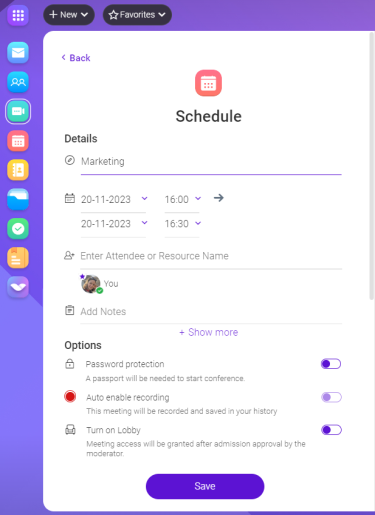
Figure. Scheduling conference.
Options:
- Password protection: enable requirement of the password to join the conference
- Auto enable recording: enable to automatically start the conference recording
- Turn on Lobby: enable to restrict participants from joining the conference without the permission of the moderator