You can send instant messages to your colleagues, share files and documents.
There are 2 ways to start a chat with any of your contact in Instant messaging list:
- Right-click on any chosen contact and select Open chat. Chat menu will appear and you can start chatting.
- Double-click on chosen contact. Chat menu will appear and you can start chatting.
Go to Contacts  , right-click a selected contact from the list of contacts and select Open Chat.
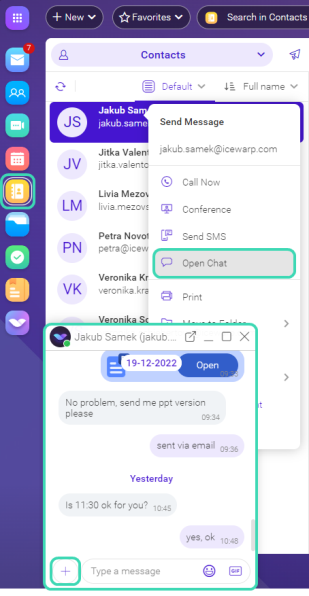
Figure. Start a chat.
You can share file or document, start a new conference or send current location directly from the chat window. Click the plus icon next to the message fiels and select requested action.
How to multi select Instant messaging contacts
If you want to send the same message or email to multiple users use CTRL + left-click.
Right-click menu
- Call Now allows to call to a contact (or group of contacts)
- Conference allows to set up a conference
- Send SMS allows you to send emails directly
- Open Chat allows to sent text message
- Print allows to print a contact info
- Move to Folder expands in more options: Move to Folder, Copy to Folder
- Duplicate allows to duplicate a contact info
- More Options expands in more options: Save as vCard, Forward by Email, Copy to TeamChat
- Invite to TeamChat allows to invite a contact to TeamChat room
- Delete allows to delete contact from your list
Conversation history
Instant messaging automatically saves a conversation history, that can be viewed anytime.
To view previous chat history in Instant messaging just scroll back and through the chat conversation. IceWarp supports infinite chat history, so it will continue to load previous messages within a chat window as long as you scroll the window upwards and as long as there is content to load. You can see the timestamps while scrolling the chat history.
In addition, you may want to search within your chat communication history. Fill in your subject (or at least a part of this word) and hit Enter. You will see the results matching to your term.