IceWarp offers a WebRTC powered voice and video calls so you can arrange non-text based communications with individuals or groups directly from IceWarp chat window. Integrated Voice over IP enables encrypted communication over the internet or a company private network. Text messaging and group messaging is included too.
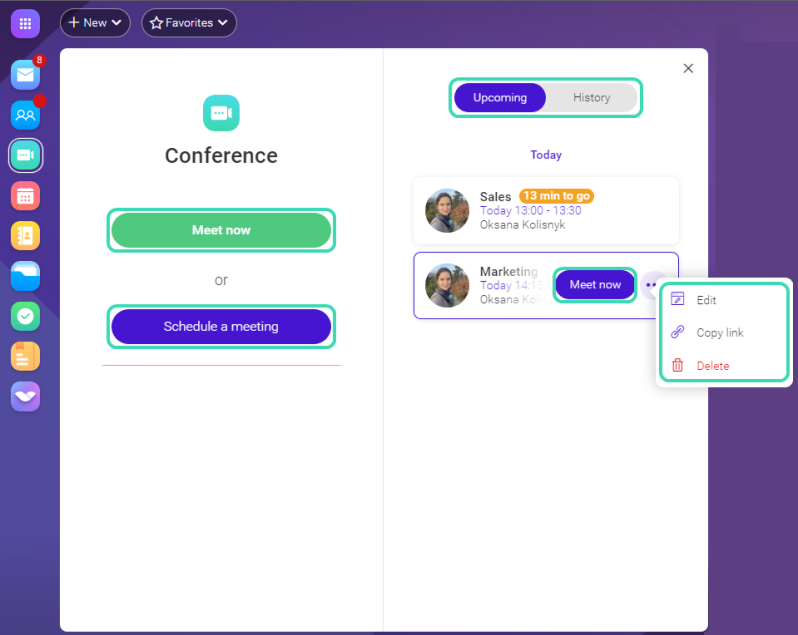
Figure. Conference.
Note: In order to be able to access Conferences, the following outgoing ports must be available on the client side: 443/TCP, 4443/TCP, 10000/UDP, 19302/UDP.
In general, client must not block UDP traffic at all and have WebRTC traffic enabled (ICE, STUN).
There are the following options:
- To start a conference immediately, click Meet now.
- To schedule a conference, click Schedule a meeting.
- You can always find all your planned future conferences in the Upcoming tab. If you want to start a scheduled conference immediately, hover over it and click Meet now. To edit the scheduled conference, click
 next to the conference name and select Edit. To invite your colleagues to a conference, click
 to copy the link and send it via Instant messaging.
- To access finished conferences, go to History tab. In case the recording was enabled, all your records are also stored there.
How to Guides
- How to Start a Conference
- How to Join a Conference
- How to Schedule a meeting
Video calls support:
- One-to-one video calls using your computer with a web camera. A pop-up window request displays for attendees to confirm a webcam access before a call starts. After accepting, you can see the other participants in a video call.
- Multi user video calls where external contacts can connect to a meeting through one-time web access or a dial-in number.
Note: Video calls with Safari are not supported.